Ask Your Website Anything
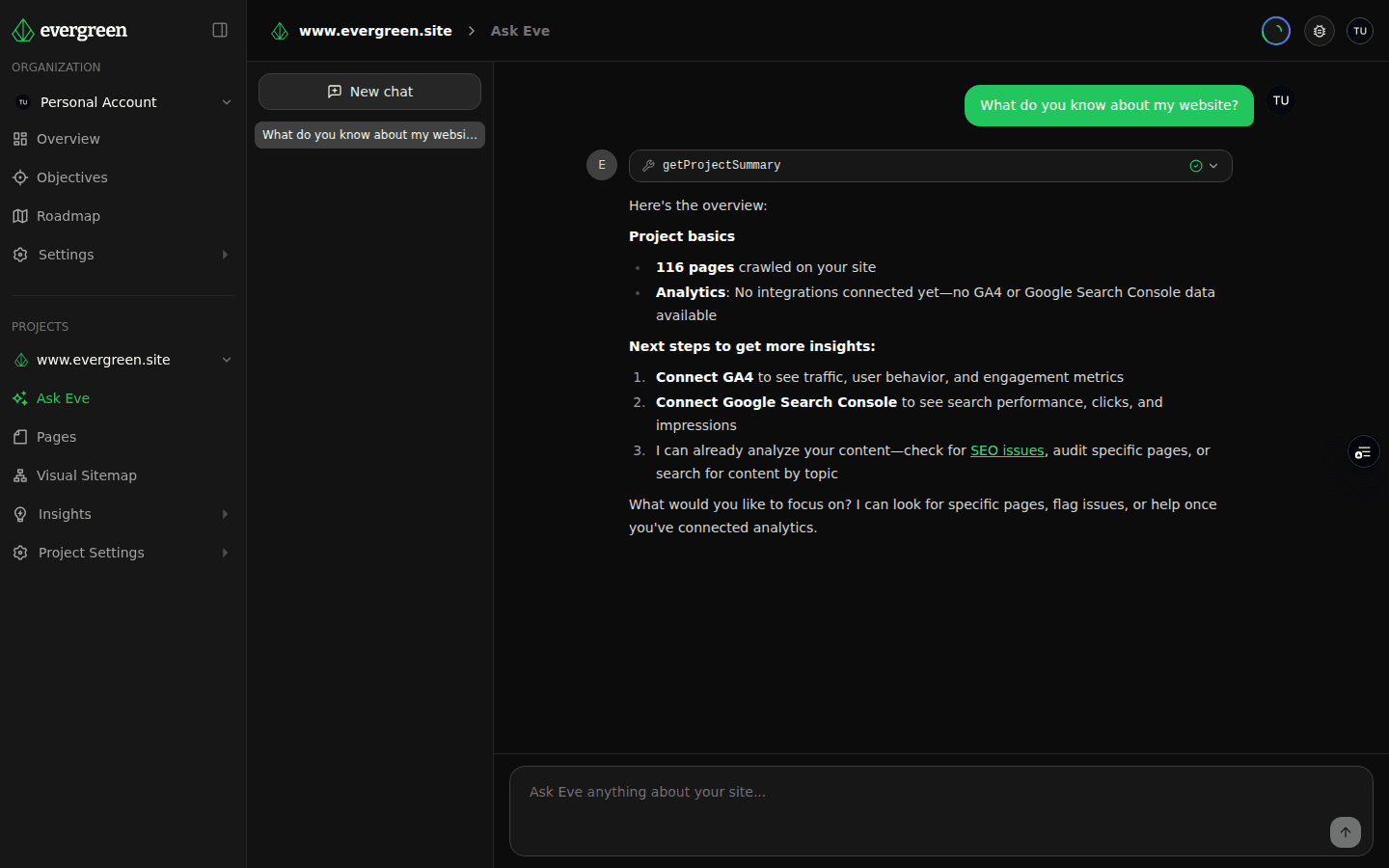
Eve is an AI assistant that knows your site inside and out. She reads your crawl data, content audit scores, and analytics — then answers the questions you actually want to ask, in plain English, with the numbers to back it up.
What you get
Conversational Site Intelligence
Ask questions like 'which pages should I improve first?' or 'what are my top-declining queries in GSC?' and get answers grounded in your actual crawl and analytics data — not generic advice.
Backed by Your Real Data
Every answer is sourced from your latest crawl, content audit, GA4 sessions, and Search Console queries. Eve cites pages, scores, and metrics so you can verify and act on what she tells you.
Find Fixes, Fast
Skip the dashboard hunt. Ask Eve to surface broken links, thin content, performance regressions, or pages losing traffic — and get a ranked list in seconds.
Competitive Comparisons
Ask how your SEO stacks up against a competitor and Eve pulls the relevant signals from your audit and GSC data to produce a side-by-side read.
Onboard Without the Manual
New to Evergreen? Ask Eve what the content audit does, how AI readiness scoring works, or where to find a specific report — she will walk you through it.
Powered by the Same MCP Layer
Ask Eve runs on Evergreen's MCP tools, so anything she can answer in the app is also queryable from Claude Code, Cursor, or any MCP-compatible tool you already use.
The Dashboard You Can Talk To
A website intelligence platform is only as useful as the answers you can pull out of it. Evergreen already crawls your site, audits its content, tracks performance, and correlates GA4 and Search Console data. Ask Eve is the conversational layer on top — so you can get to those answers by asking instead of clicking.
Type a question. Eve reads your latest crawl, your audit scores, your analytics, and responds with a direct answer, the relevant pages, and the numbers behind it.
Questions Eve Answers Well
Eve is tuned for the questions website owners, SEOs, and content teams actually ask day to day:
- "Which pages should I improve first?" — Eve ranks pages by a blend of audit score, traffic, and recent GSC trend, and returns a prioritized list you can act on.
- "What does the content audit do?" — Eve explains features, scores, and methodology so new users do not have to hunt through docs.
- "Summarize my top GSC queries." — Eve pulls your Search Console data, groups by intent and trend, and highlights what is gaining or losing impressions.
- "Compare my SEO to a competitor." — Eve produces a structured comparison of the signals Evergreen tracks across both sites.
- "Which pages have broken links or missing meta descriptions?" — Eve surfaces audit issues with the page URLs attached so you can fix them immediately.
- "What changed since my last crawl?" — Eve diffs the latest crawl against the previous one and calls out new issues, score changes, and page additions or removals.
Grounded in Your Data, Not Guesses
The difference between Ask Eve and a generic chatbot is the context. Every response is generated against the data Evergreen has collected for your project:
- The latest crawl results, including page-level metadata, link graphs, and response codes
- Content audit findings with per-page scores, issue severity, and recommendations
- Lighthouse and Core Web Vitals history
- Connected GA4 sessions and Search Console impressions, clicks, CTR, and position
- AI readiness scores from AEO/GEO analysis
When Eve answers, she references specific URLs, specific scores, and specific metrics — so you can click through to verify, dig deeper, or export the underlying data.
Built on Evergreen's MCP Tools
Under the hood, Ask Eve uses the same MCP server that powers Evergreen's integrations with Claude Code, Cursor, and other AI tools. That means anything Eve can answer inside the dashboard, you can also query from your IDE or custom agent workflow — using the exact same tool definitions.
The practical upshot: Ask Eve is not a separate AI stack with its own quirks. It is the same MCP layer surfaced as a chat interface for teams that want answers without leaving the app.
Where Ask Eve Fits
Ask Eve is not a replacement for the dashboard. The visual sitemap, content audit, and analytics correlation views are still the best tools for visual exploration and deep investigation. Ask Eve is for the moments in between — when you have a specific question, you know the data is in there somewhere, and you just want the answer.
Most users end up using both: ask Eve for the quick read, then open the detailed view when they want to drill in.
Start Asking
Ask Eve is available in every Evergreen project. Open the Ask Eve tab, type a question, and get an answer sourced from your own site data.
Ready to try it yourself?
Start with a free account and see what Evergreen can reveal about your website in minutes.
Get Started Free →No credit card required. Just insights.
